

A safari deposit invoice is the moment a trip stops being a conversation and starts being a commitment. The client has accepted the quote. Lodges are holding rooms. A vehicle is pencilled for the dates. Until the deposit arrives, your company carries the risk of a booking that can still fall away. This piece is for owners, reservations managers and consultants at safari operators and DMCs across Africa who want deposits in promptly, balances collected before departure, and a plain view of who still owes what.
What a safari deposit invoice is for
On a multi-lodge itinerary the sums are rarely small, and they are rarely all yours to keep. You may be paying camps, a vehicle company, guides and park fees that are hard to recover once permits are issued. The deposit shares that risk with the traveller, or with the agent booking on their behalf. The balance finishes the collection before the group flies, when changing plans is costly for them and for you.
Operators set their own terms. Some ask for a deposit when the quote is accepted, and the balance a set number of weeks before arrival. Some split what is left if the trip is far off, or if an agent prefers to pay in stages. There is no single formula to copy. What matters is that the quote and the invoice match, and that someone on the team can see which invoices are paid without a spreadsheet.
A clear safari deposit invoice does three jobs. It states what is due now, as distinct from what will be due later. It points to the trip it belongs to, so a family departure and a honeymoon in the same month stay separate. And it gives the client a straightforward way to pay, including by card, so the money is not waiting on a transfer instruction that never quite gets actioned.
If deposits live in a separate accounts tool, the quote, the invoice and the question of payment live in three places. Safari Studio keeps the quote, the deposit invoice, the balance invoice and the payments on the deal, so the person who built the trip and the person who chases money look at the same record.
On a handover, a missing invoice drops the currency, the due date or the services the deposit was meant to secure. For example, a reservations manager on a Serengeti file should not have to ask which figure the client agreed.
From an accepted quote to deposit and balance
Start before anyone opens a blank invoice. Build the costing day by day, with lodges, vehicles and activities at the rates you negotiated. Each amount is stored with the exchange rate of the day, so the margin stays right when rates move. From that costing you make the quote. When the client accepts, you raise the deposit from the quote you already agreed, rather than retyping the trip into a fresh template.
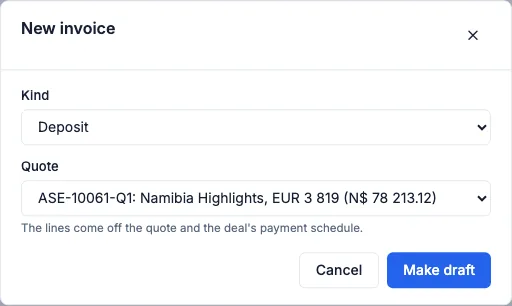
In Safari Studio, quotes become deposit and balance invoices, and every payment is tracked against the deal. You can raise those invoices in any currency. An agent may want dollars, a traveller may expect euros, and a supplier may invoice you in the currency of the country you are booking. The deal can hold its value at the day's rate, and the invoice goes out in the currency you agreed.
The deposit invoice covers what is due on acceptance, enough to secure the holds you are about to confirm. The balance invoice covers the rest, with a due date before the safari starts and before your supplier deadlines. For example, a DMC sending a couple through the Okavango might raise the deposit the day the quote is accepted, and date the balance so there is still time to release a camp if the money does not arrive.
Two invoices make the chase simpler than one vague request to pay something. You can see a deposit that never came in, separately from a balance that is not yet due. If an agent is the payer, name the trip and the dates so an accounts person can pay the right file.
Your logo, colours and theme appear on the proposal, the quote, the invoice and the client form. On Pro and Max, clients never see Safari Studio on those documents. Lite adds a small Powered by Safari Studio line. What each plan includes is on the pricing page.
If a rate changes after acceptance, agree a revised quote before you raise a revised balance. A surprise total stalls payment. Day by day costing stores each amount with the exchange rate of the day, and can show totals per adult and in other currencies.
Taking card payments on the invoice
A card payment button on the invoice lets the client pay without hunting for bank details in an email. For many travellers booking from overseas, card is often the quickest path from an accepted quote to money received. You raise the invoice, they pay by card, and the payment is tracked against the deal.
Not every client will use a card. Some agents settle by transfer on their own payment run, and some travellers prefer a transfer for a large balance. The invoice still states the amount, the currency and the due date, and the transfer is tracked against the same trip. The card button is an option, not a rule. Safari Studio does not replace your bank or your accountant. It keeps owed and paid visible on the booking, with no spreadsheet to keep up to date.
A few habits keep both kinds of payment on track:
- Raise the deposit invoice the day the quote is accepted, not at the end of the week when holds are already ageing.
- Put the due date on the invoice, and use that same date when you speak to the client or the agent.
- Track the payment on the deal as soon as you know it has arrived, by card or by transfer.
- Raise the balance early enough that a failed card payment still leaves time before your tightest supplier deadline.
- If an agent wants a different currency from the accepted quote, agree it and invoice from the deal.
Gmail syncs both ways, other mail can arrive through a forwarding address, and needs reply flags so a payment query does not wait.
Who owes what, grouped by how late it is
The invoice that causes trouble is rarely the one you raised this morning. It is the balance you meant to chase, and the deposit still open while a lodge asks you to confirm or release.
The Money screen groups what clients owe by how late it is, and lists open invoices with their status and due dates. A deposit only just over is a short note. A balance open for much longer, on a trip that starts soon, is a different conversation.
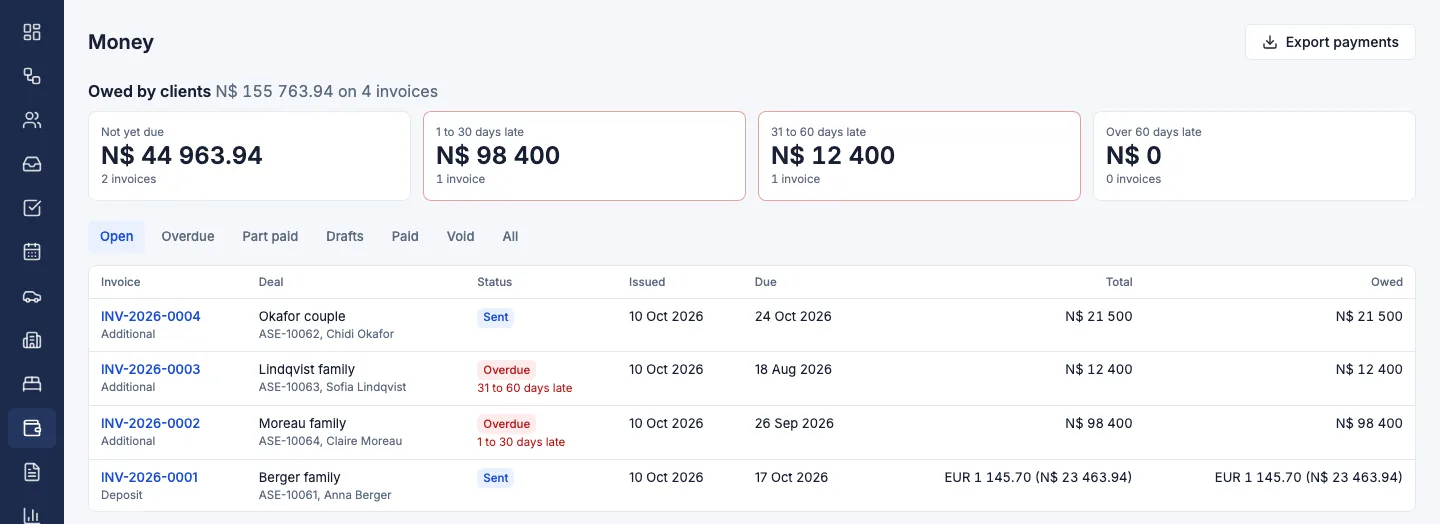
Open that screen before new enquiries take the morning. Paid and owed are in view together, which is often the difference between chasing the right invoices and finding a missed balance late on a Friday.
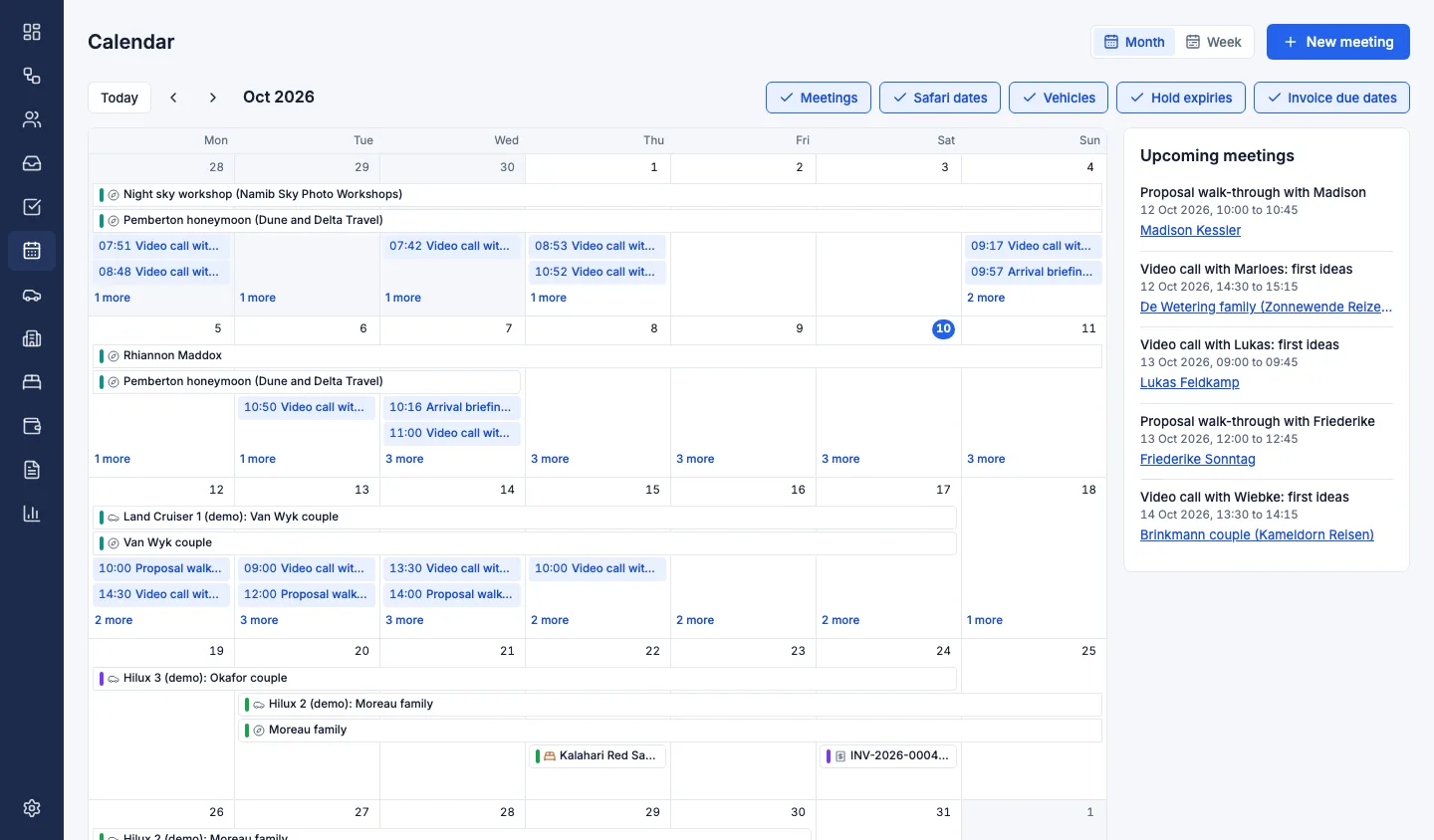
Due dates also sit on the calendar, with meetings, safari dates, vehicle bookings and hold expiries. A balance due in the same week as a hold expiry is one decision: confirm because the money is in, or chase the client and speak to the lodge before the hold lapses.
Holds and invoices stay separate. Every room you request sits on the holds board: requested, held with an expiry date, confirmed or released. Before a hold runs out, a chaser email is ready to go. That chaser is about the room, not the card. A lodge will not extend a hold for a tidy invoice, and a client will not pay faster if the camp was never confirmed.
Chasing late payers without souring the trip
Chasing is reservations work. A calm, specific note, sent before the due date becomes a problem for the camps you promised, is usually enough. Silence is what turns a willing payer into a late one.
Name the trip and the dates. Say whether you mean the deposit or the balance. State the amount, the currency and the due date. Ask for payment, a date they will pay, or a reply if the invoice is wrong. Point them back to the card payment button if a transfer is what is slowing them down. If they pay by bank, ask for proof so you can match it the same day.
Most desks can keep this sequence:
- Before the due date, note that the invoice is coming due, with the amount, the currency and the date.
- On the due date, send a plain reminder if it is still open. You do not need to apologise for the terms they accepted.
- After the due date, name what you cannot hold. Only say you will release a camp if you will actually do it.
- If an agent pays, write to the booker as well as any accounts address.
- When the payment is tracked, tell the client it is received.
Templates keep the tone steady: one for a deposit coming due, one for a balance overdue. A follow-up task covers a promise to pay on Friday, or a call to a lodge if the deposit is still open on Thursday. Automations can create those tasks, flag replies, move stalled deals and turn new emails into deals. A rule can support the chase. It should not decide whether a room is released.
Say only what you will do. For example, a lodge operator in the Okavango might write that an unpaid deposit means the hold ends on the expiry already agreed. Agents need a date as well as an amount. If that date slips past a hold expiry, say so early.
Avoid the habits that slow payment down:
- Do not treat a promise as payment. Track the card payment or the transfer.
- Do not leave the balance until the week of travel.
- Do not chase only by phone, and do not threaten a cancellation you will not carry out.
If the client disputes the balance, pause and answer from the quote and the costing. Show the accepted total, what is already tracked, and what remains. Correct the invoice if you were wrong. Needs reply flags keep that question from waiting in a general inbox. How flags and templates sit on the deal is set out with inbox and enquiries.
Before the traveller flies
Once a week, open the Money screen and start with what is badly late on near departures, then invoices only just over, then ones due in the coming days. For each, track the payment, send the chase, or set a task with a name and a date. Read due dates beside hold expiries on the calendar in the same pass.
Chase in the currency of the quote. The rate stored with the costing is for your margin, not a surprise line on the balance. The aim is simple: deposit in before you confirm what you cannot undo, balance in before the traveller flies, late invoices visible by how late they are.
If quotes already live in Safari Studio, raise the next deposit from the accepted quote and put the Money screen on a fixed day. Quotes, invoices and payments sets out deposit and balance invoices, the card payment button, and late payments grouped by how late they are.
Book a demo if you want to walk through a deposit and a balance on a trip like yours, or start a free trial if you would rather raise the next safari deposit invoice yourself. The trial needs no card.