

A double-booked 4x4 is not a small admin error. It is a guest at the airstrip, a guide already out on someone else's trip, and a reservations manager trying to borrow a vehicle before the light goes. Safari fleet management is the plain work of knowing, for every vehicle and every day, whether that car can leave.
This is for owners, reservations managers and consultants at safari operators and DMCs in Africa. It covers timelines, services and blocked days, for the 4x4s you field and the guides who drive them.
Where double bookings come from
Most clashes are not a careless diary entry. They come from the way a fleet is sold.
A vehicle is rarely just free or just busy. It might be confirmed, held for an unaccepted quote, due for a service, or standing because its guide is on leave. Those states often live apart: a departure spreadsheet, a workshop message, a leave notebook, and an inbox. Each can be right alone and wrong together.
The risky moment is a yes given too early. An agent asks for six guests from the second to the twelfth. The departure sheet shows a gap, so someone confirms. They miss a service on the ninth, or a guide already out on overlapping dates. The guest then has a proposal.
A quote should still block the car. If it is not on the same line as confirmed trips, the next person will treat the vehicle as free. A hold in one person's memory is not a hold the desk can trust.
Positioning days vanish the same way. For example, a mobile operator in the Okavango may need two days to move a vehicle to the next pickup, then a day to restock and check tyres. Unblocked, that looks like a gap. An empty transfer is still work.
Guides are the other scarce resource. A vehicle without the right guide is not available. If leave and training sit nowhere near the vehicle, you can sell a sound car for a trip no one can lead. Relief guides help only if they are actually free. A name on a roster is not the same as a person who is not already out, not on leave, and able to take that route.
What a useful safari fleet management timeline shows
A timeline helps when one person, on one screen, can answer a plain question: can this vehicle do these dates, or not?
In Safari Studio, the fleet timeline is that screen. Every vehicle sits on one line, with its trips, services and blocked days. One row per vehicle. Trips as bars across the dates. Services and blocked days on the same line. Assign a car to a trip and the clash shows before it happens.
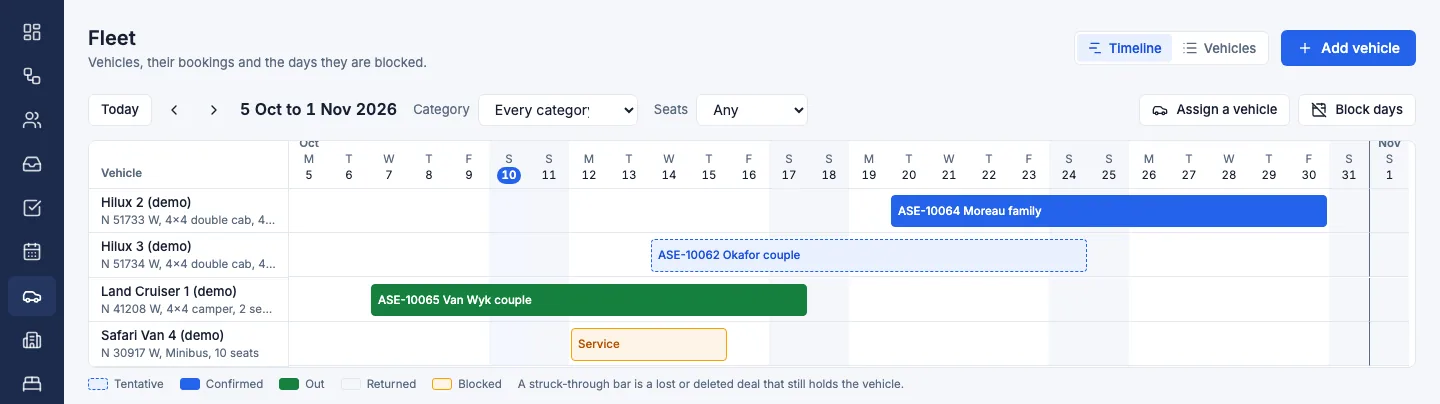
Vehicles down the side, dates across the top. A bar is a booking, a tentative hold, or a service. Where a bar sits, the vehicle is not free, even if it is waiting on a part rather than carrying guests.
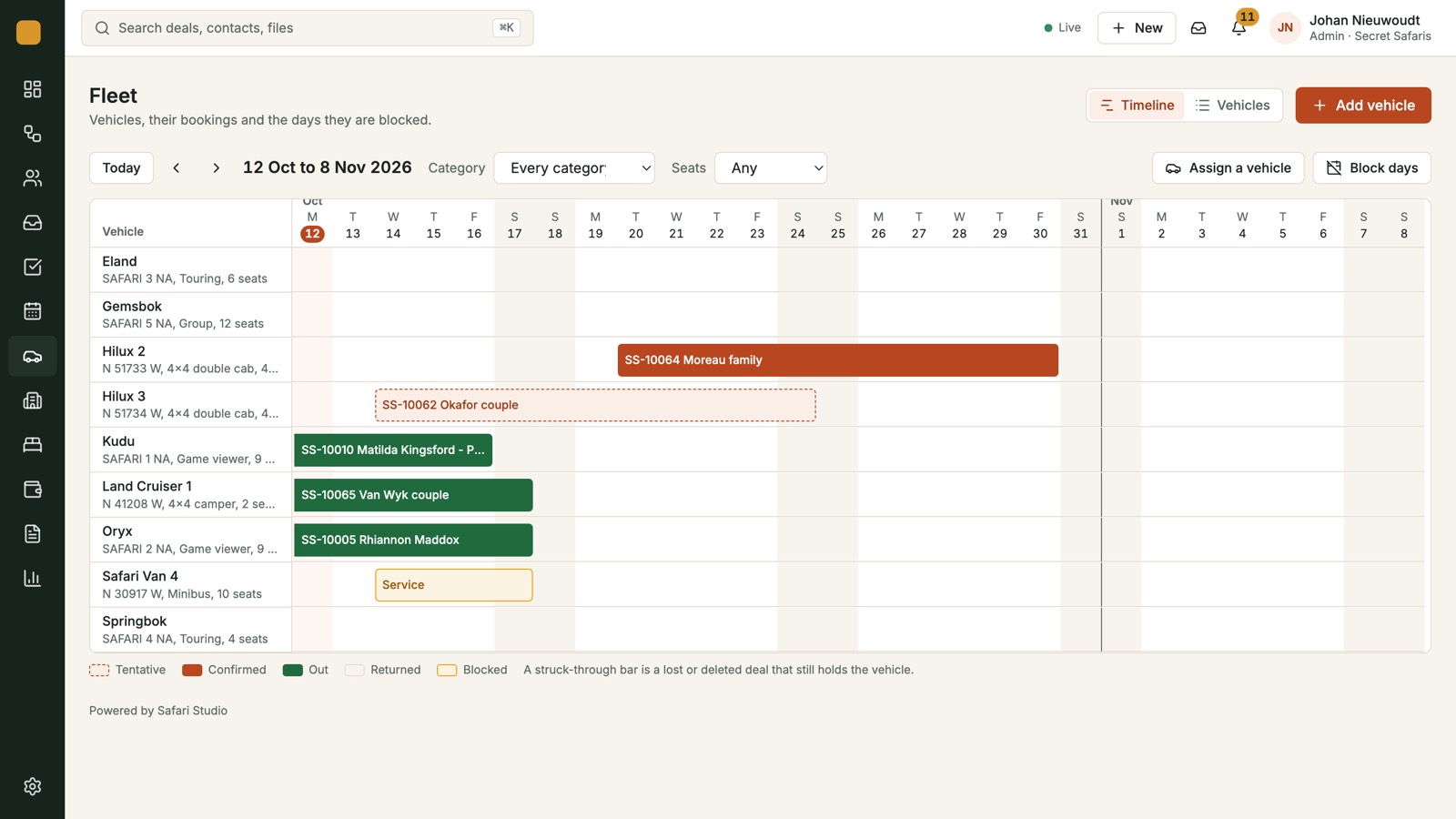
Keep these current on that line.
- Confirmed trips, from the day the vehicle leaves the yard to the day it returns
- Tentative holds, so a live quote is visible to the next person
- Services, for the whole spell with a mechanic
- Blocked days for guide leave, owner use, training, positioning and recovery
An email is not a bar. Nor is a phone promise. Two bars on one vehicle should be obvious without a second file. So should a service sitting under a trip you are about to sell.
Services and blocked days
Departures are easy to draw. Services and blocked days stop a yes becoming a problem on day six.
A safari 4x4 needs time that earns nothing: services, repairs, a wait for a part, a licence renewal, new tyres. If that time is missing from the timeline, someone will sell the week the vehicle is on the ramp.
Parts are the awkward case. A vehicle can sit in the yard and still be unsellable, because a propshaft or a windscreen is on its way. Block the row until the vehicle is back in service, not merely until the part has been ordered.
Block the whole spell. If the workshop has the vehicle from Monday and hopes for Thursday, the bar runs Monday to Thursday. If Thursday slips, extend it that day. A blank left by a Tuesday note will be sold.
Blocked days cover a sound vehicle that still should not go out.
If a guide and a vehicle travel as a pair, put days off, annual leave and training on that row, unless a relief guide is named. For example, a small operator in northern Kenya might block five days for a first aid course, even though the vehicle is in the yard.
After a long trip, allow a day to clean, repair and reprovision. If the next pickup is another airstrip, add the empty run. Owner use, a loan to another camp, and a breakdown spare are blocks too. Release a spare on purpose, not by forgetting the block.
Assign the vehicle before you promise it
Use the timeline when you assign the car, not after a deposit is paid. If the dates are taken by a trip, a service or a blocked day, the clash should show then, not on the morning of departure.
A short order of work keeps this honest.
- The enquiry becomes a deal, so it is not left in a folder.
- Read the fleet row for the dates, plus a day or two either side.
- Assign a vehicle only if the row is clear.
- If the quote is still open, a tentative hold on the row shows colleagues the car is spoken for.
- Tell the guest what the timeline supports, including a later date if the right vehicle is in service.
A verbal yes that never becomes a deal is invisible. Website enquiries can arrive on the deals board as new deals, with the email thread linked. That gives the request a home. It does not assign a vehicle. Someone still has to check the row and see no clash.
Give every vehicle hold an end. One that never expires freezes a car. One that lives only in a sent email does not freeze it. Colleagues should see a bar.
Rooms are separate. Every room you ask a lodge for sits on the holds board: requested, held with an expiry, confirmed or released. A confirmed room does not mean the 4x4 is free.
Guides, pairings and the days between
The timeline will not choose the guide. Treat a missing guide as a reason to block the vehicle, or settle the guide before you assign the car.
Before you confirm, ask three questions.
- Is the vehicle free on every date, including arrival and departure?
- Is a guide free for this route, language and group?
- Are the days between trips enough for rest, service and positioning?
If the guide is not free, do not assign the car and hope. Block the days, move the dates, or name a pair that is free. A relief guide already out is not free.
A family on a first safari is a poor match for a guide already promised elsewhere. The timeline will not make that call. It will stop the vehicle being used twice while you do.
Consultants and DMC teams often sell a vehicle they will not see. The office and the yard should read the same bars, so a longer service or a new hold is visible to both. If you are the operator, do not let a partner confirm a vehicle you have not put on the timeline. If you are the DMC, ask which dates they can actually run. A quick yes on the phone is not a bar on a row.
One month, two questions
The calendar is the month. The fleet row is the car. A week can look possible on the calendar and still hide a service on the vehicle. Look at the row before you promise anything.
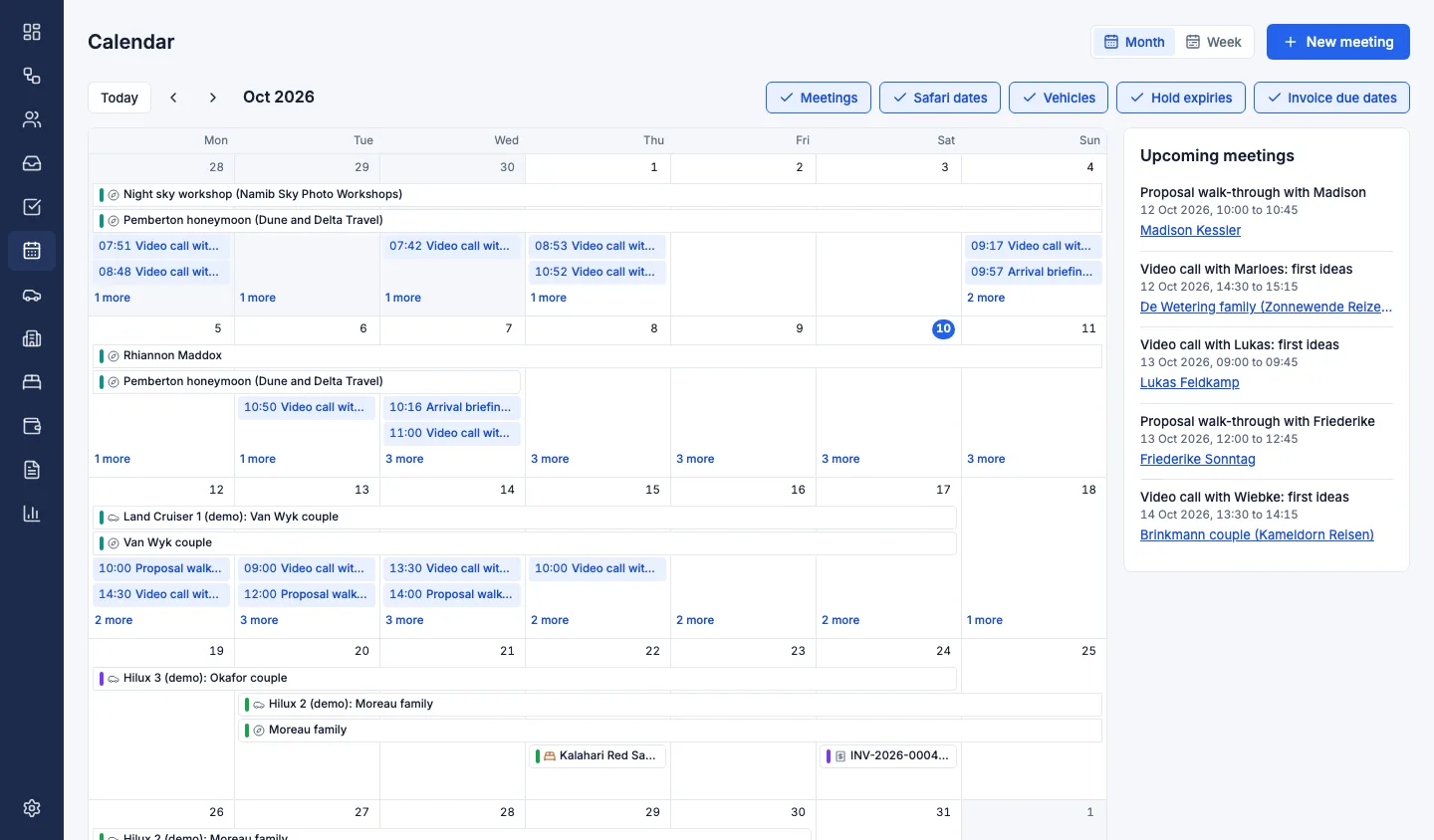
The calendar is where meetings, safari dates, vehicle bookings, hold expiries and invoice due dates sit together. Use it to see what the week contains. Use the fleet timeline to see whether a particular 4x4 can take the enquiry.
When a vehicle goes to the workshop, or guide leave is agreed, update the row the same day. Do this with the person who knows the vehicles, not only the person who sells them. A reservations manager can see a gap. The workshop knows when that gap is false.
Before you confirm, read the weeks ahead
Once a week, and before any overlapping departure, read the coming weeks on the timeline. Look for four things.
- Two bars on one vehicle that touch or overlap
- A departure with no vehicle assigned
- A service or block that is still only verbal
- A tentative hold that should be confirmed or released
Name the guide for each departure, or block the vehicle until you can. If someone is close to too many days in a row, move a date or arrange relief while you still can.
A clear row is not a price. Cost the vehicle in the day by day costing, with lodges and activities, at the rates you negotiated, and only once the dates are real. If a service forces a move, change the dates before you send the proposal.
Plans are on the pricing page. Safari Studio is sold as a monthly, quarterly or yearly subscription, with a free trial and no card needed to start.
Trips, services and blocked days on one line, and a clash that shows before you assign the car, are how you avoid booking a 4x4 twice. They are also how you stop promising a guide who is already out.
If you want to see the timeline on your own vehicles, book a demo or start a free trial.