

When two safari departures share a day, the question is not how many vehicles you own. It is which one is already committed. Safari vehicle allocation, done at the reservations desk, is the work of reading those dates before a car is confirmed to a client, an agent or a colleague.
That sounds plain until the trips overlap. A private mobile departure might run for eight nights. A shorter trip might start while the first is still out. A third group might only need a vehicle on the morning the long trip comes back. Each one needs a particular vehicle on particular days, and those days cut across each other. A fleet list cannot show that. A line of dates can.
This stays at the desk. It is the question a reservations manager asks before a departure is locked in. It is not about following a car in the bush, and it does not assume a driver app or a live position. The useful picture is every commitment already drawn across the month.
Safari vehicle allocation starts with the shared day
Owners often picture the fleet as a list. Consultants picture whoever sounds free this week. The desk has to think in days. Overlapping departures rarely collide for a whole week. They collide for one morning, two nights, or the awkward day when one trip is still out and the next one wants to leave.
Take a clearly labelled example. A mobile operator in northern Botswana has a seven-day trip leaving on Monday. A private departure, sold through a DMC, wants a vehicle from Friday of that same week. On a list of vehicles, both trips look possible if the only question is whether anything is out next week. On a date line, Friday and Saturday already belong to the first trip. The second departure cannot have that vehicle unless you take it off a group that is still in the field.
A column of yes and no cannot do this job. It can tell you a vehicle has a trip this week. It cannot tell you which days are taken, or whether the free gap is long enough for the departure you are about to confirm.
What already committed means
A vehicle is committed on a day when something on that day already claims it. On a busy desk those claims get split across notebooks, and then they stop looking like claims.
A confirmed trip is the clearest. The dates are sold, the guests are coming, and the vehicle has to be there. Assign the same car to a second trip that touches any of those dates and you have a double booking, whether or not anyone has said so yet.
A tentative hold is quieter. The quote is not confirmed, but someone has pencilled the vehicle so two consultants do not both promise it. If that hold is invisible, the desk keeps offering the same 4x4 to every open enquiry that week.
A service day or a blocked day is a different claim. The vehicle is not on a game drive, and it is still not free. It may be in for work, kept back beside a long departure, or blocked because it cannot be in two camps on the same date. If those days sit in a diary reservations never open, the picture on the desk is wrong.
None of this asks where the vehicle is this hour. Commitment is a date fact. A bar covers the day, or it does not.
One row, then the clash
Safari Studio puts the fleet on one timeline. Every vehicle has one row. Trips sit as bars across the dates. Services and blocked days sit on the same line, so the reason a vehicle is unavailable is next to the trips, not in a second book. Assign a car to a trip and the clash shows before it happens.
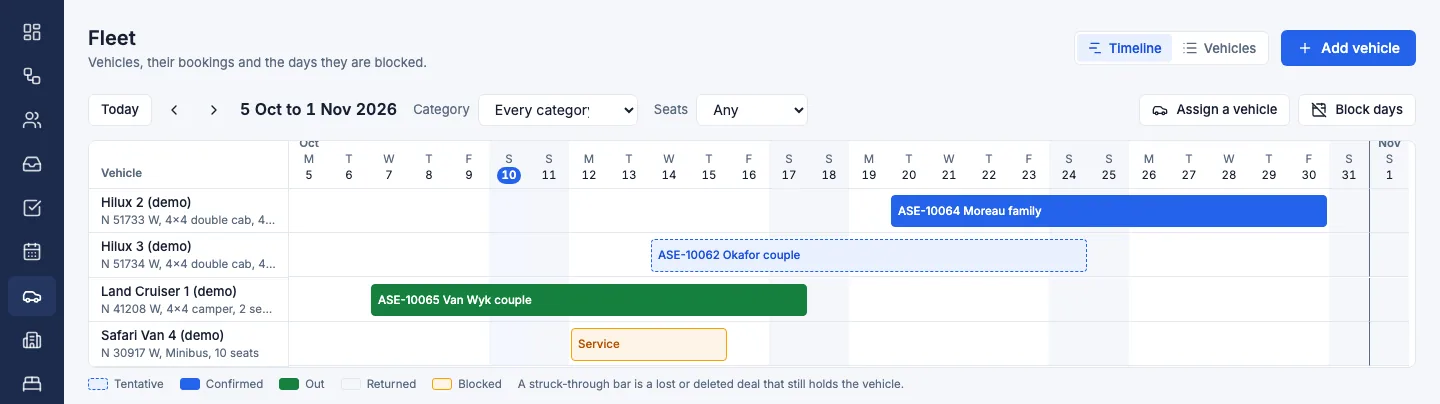
Read it as you would read a camp chart, with vehicles in place of rooms. Find the row. Find the first day the trip needs the vehicle. Walk forward to the last day, including any day you already know the vehicle cannot work. If a bar crosses that stretch, the vehicle is committed. If the row is clear, it is the one you can assign.
The same layout is easy to see as bars: vehicles down the side, dates across the top, bookings and a service on the line.
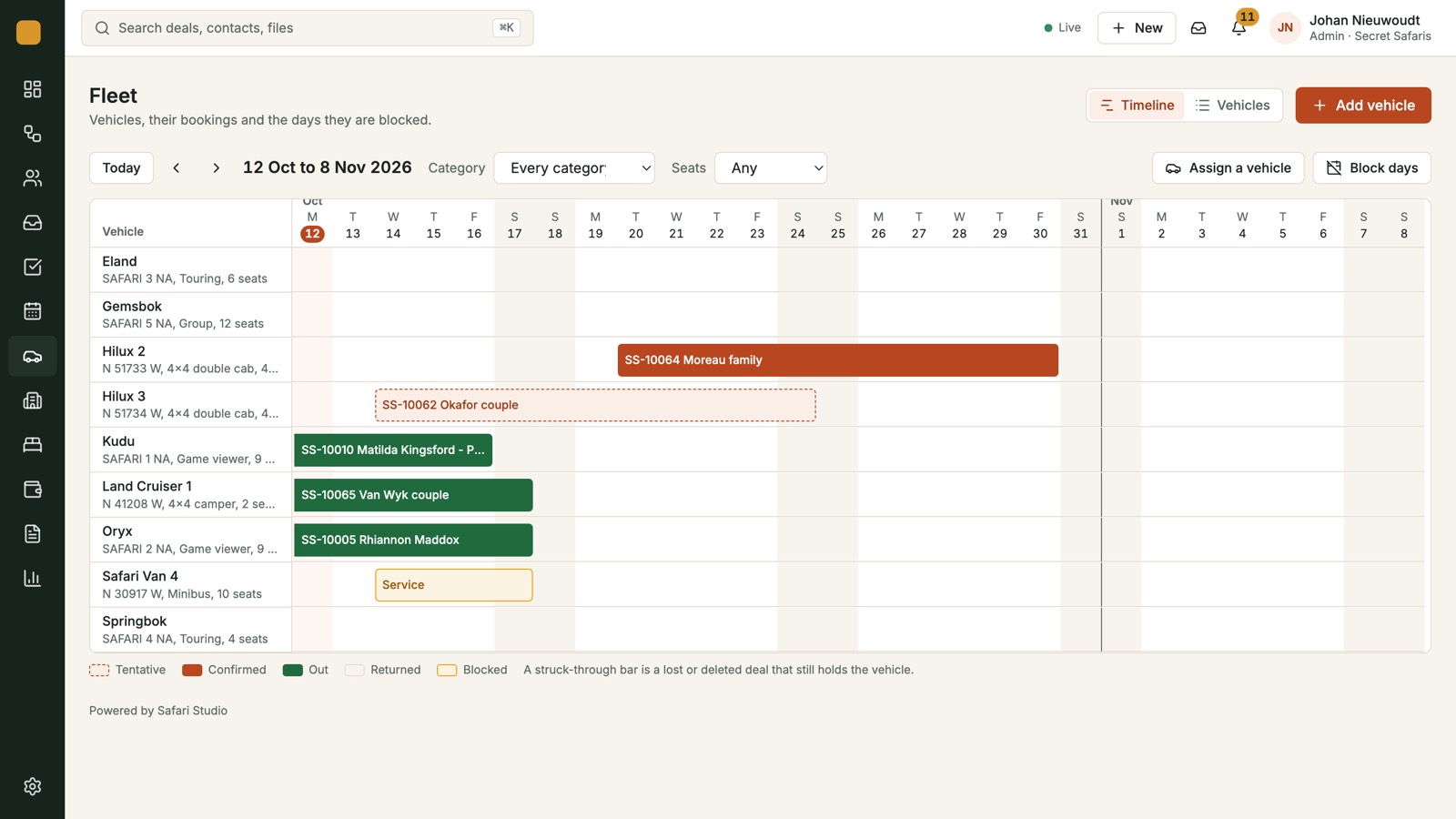
A bar is easier to trust than a cell that says busy. A cell does not show whether the busy stretch ends the night before your departure or the night after. A bar does. For overlapping departures, that edge is the decision. The aim is no 4x4 booked twice.
How the rows, trips, services and blocked days sit together is set out on the fleet timeline, with one row per vehicle.
Where the overlap hides
Most clashes are not two identical trips on the same Monday. They are partial overlaps, and partial overlaps hide when each file is checked alone.
A long departure covers a short one. The long trip was noted as out until the 18th. The short trip was noted, somewhere else, as needing a vehicle from the 16th. Nobody compared the 16th, the 17th and the 18th as shared days. Both notes were accurate. The vehicle still cannot do both.
Two departures share only the start. Both groups leave on Thursday. One trip is three nights, the other is six. A Thursday list is not enough, because the longer trip also claims the days after. Allocate from that list alone and a Friday enquiry, which looks unrelated, is offered a vehicle that is already out.
A tentative trip can sit beside a confirmed one. The confirmed departure was allocated. The tentative one lived as a margin note, because it was not real yet. When it confirms, the dates already belong to someone else. On the timeline that pencilled claim is visible, so the next allocation meets it.
One row puts the long trip, the short trip, the tentative hold and the blocked day on the same dates. The overlap is a picture, not a tidy-up after a guest has been told the wrong vehicle.
A routine before the car is confirmed
You rarely get a quiet hour to audit the whole fleet. The useful habit is smaller. Use it when a departure is about to be promised a vehicle, and again when two trips in the same week are both still live.
Start with the dates, not the favourite vehicle. Note the first morning the vehicle is needed and the last evening it can be released. Include the shared day, even when it feels like only half a day. That half day still occupies the row.
Then read the row, and only that stretch:
- If a trip bar already covers any of those dates, stop. The vehicle is committed.
- If you see a tentative hold, decide in the open. Keep the hold and choose another vehicle, or take the hold off because the quote has gone quiet.
- If you see a service or a blocked day inside the stretch, treat it as firmly as a trip. The row is not free for a game drive that day.
- If the stretch is clear, assign the vehicle to the trip, so the rest of the desk can see the bar.
Do not allocate over a hold and hope the first quote dies. Two promises on one stretch become an apology. Do not clear a block just so a quote will fit. If a block changes, change it on the same line, so the next person sees the month as it is.
A vehicle name in an email does not stop the next person offering the same car. A bar does. Check every departure that touches the shared days, not only the enquiry in front of you. The trip confirmed last week can still cover Friday.
Several groups leaving the same morning
Departure morning is when a loose allocation shows. A few groups may leave before ten. One vehicle may be due back from a trip that ended yesterday. Another may be blocked. The consultant who sold the trip is not in the yard. The person at the desk is.
A list of today's departures tells you who is going. It does not tell you which vehicle left three days ago and returns tomorrow. Read from that list alone and every vehicle not on it looks free. Some of those vehicles are mid trip. They are committed. They are simply not departing today.
Read the month, then read today inside it. A free morning is an empty stretch on the row. A vehicle that left on Monday still has a bar running. A service day sits on the same line, so it is not sent to the airstrip just because the departure list looked short.
For example, a desk at a Kenyan operator might have a day trip and a private departure both asking for a game vehicle on Saturday. The day trip ends that afternoon. The private departure runs through the following Friday. Only the bars show that Saturday is shared and the rest of the week is not.
Match the length of the bar to the length of the departure. Refuse the match when the bars would cross.
Let the clash be the answer
Hiding a clash so the quote can go out does not create a vehicle. It creates two promises, and the guest who confirms second is the one left without a car. On a small fleet that is ordinary. Busy weeks stack long mobile trips, short hops between lodges, and days when open vehicles are already out, blocked or held. Refusing the second allocation is the desk doing the job.
Offer different dates, or a vehicle whose row is clear. Put a tentative hold only on a row that is actually free. Or tell the agent the fleet is committed. If the trip is confirmed, the bar should be confirmed. If no row is free, the trip is not ready to confirm.
A name in a spreadsheet, or a line in the inbox, is not the allocation. If it is not on the row, the next person cannot see it.
A standard for the shared days
Every game vehicle you allocate has one row. Every confirmed trip that needs a vehicle has a bar covering the days it needs, including the awkward shared day. Every serious tentative claim sits on that row, not in a private note. Services and blocked days sit on the line, so a gap is a real gap. Nobody confirms a vehicle to a guest until the assignment has been tried and any clash has been dealt with.
That is safari vehicle allocation in practice. The desk does not need a pin on a map, or a message from a driver, before it can answer. A covered day is taken. The owner, the reservations manager and the consultant should be looking at the same dates.
Plans are on the pricing page. There is a free trial, and no card is needed to start.
Walk a crowded week on your own dates, and book a demo. Or start a free trial and lay the departures you already have onto the rows. The shared days will show which vehicle was already committed.