

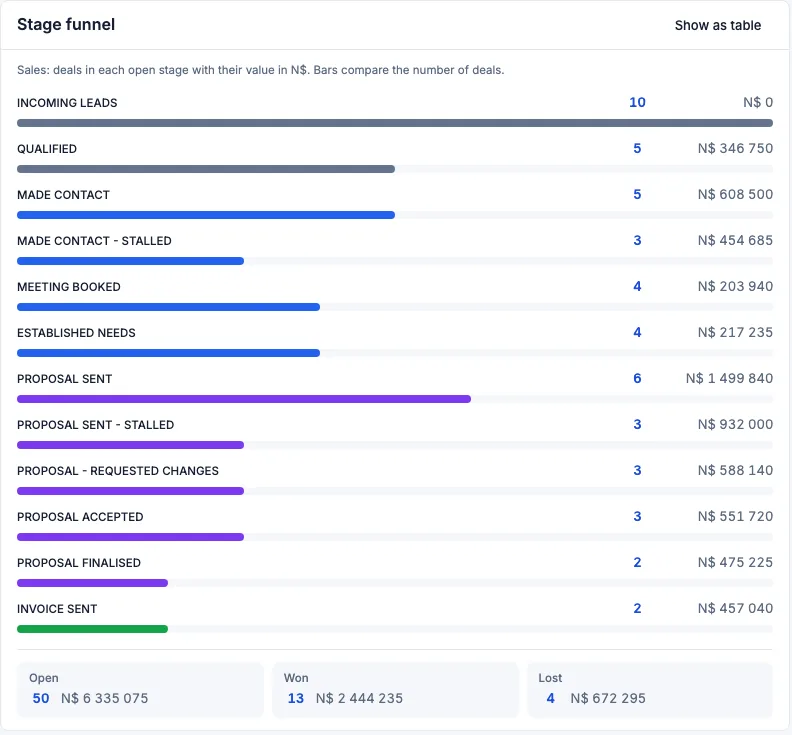
A safari CRM is the system a safari company uses when spreadsheets and email folders stop being a calm way to sell trips. It holds the enquiry, the client, the mail, the costing, the lodge holds, the vehicles and the invoices against one deal. If you own a small operator or a DMC in Africa, and the week still runs from a workbook and a set of folders, this is a practical look at what that tool is, and at how to tell whether you need one.
What a safari CRM actually does
A general sales tool tracks people and stages. Safari work asks for more, because the product is a trip that does not exist until you assemble it.
For example, a couple writing from Europe may want eight nights in northern Botswana: two camps, a vehicle, a guide, and a night that only works if a lodge will hold a room until Friday. The price depends on rates you negotiated, on how many adults are travelling, and on the exchange rate the day you costed the trip. The booking is not firm until the hold is confirmed and the deposit has arrived.
That is the work a safari CRM is shaped around. Not a contact list with safari words pasted onto the stages. The client, the dates, the mail, the money and the operations sit on the same deal, so a reply weeks later still makes sense beside the costing you sent.
Safari Studio is a CRM for safari operators, DMCs and the travel agents who sell their trips. You take it as a monthly, quarterly or yearly subscription. A free trial is included, and no card is needed to start. This article will not state a price or a plan limit. Those sit on the pricing page, and only there.
Where spreadsheets and email folders slip
A small company can run well on spreadsheets and email for a long time. One owner, one reservations manager, a handful of departures a month, a costing file that person trusts: that is a working system. If you can see every live trip, every unanswered note and every hold expiry without hunting, keep the sheet. Changing tools costs attention, and attention is what you sell with.
The slip is usually quiet. Mail starts to live in more than one place. The website form drops enquiries into a folder nobody opens before lunch. A second address, often a personal inbox still printed on an old card, receives a reply the desk never sees. Two people answer the same client, and the story splits.
The sheet slips on money and on time. A lodge rate from March is not the rate in the cell if someone copied last season's file. A hold expiry is a date in a cell, or in the memory of the person who sent the request. If that person is on a familiarisation trip, the hold can lapse without anyone choosing to release it.
None of this means the company is careless. It means the trip is larger than one person's head. That is when a safari CRM starts to earn its place: not because you want new software, but because reconstructing one booking has become a search.
Mail and the deals board
In Safari Studio, mail from every synced mailbox sits in one list. Each thread is linked to its client and to its deal. Website enquiries arrive on the deals board as new deals, so nothing waits in a folder to be copied across. The website enquiry form feeds the board.
Gmail syncs both ways, and two-way Gmail sync keeps every reply beside the trip it belongs to. If your mail is not Gmail, any other provider comes in through a forwarding address.
Needs reply flags show where a client is waiting, so no client waits because a note landed with the wrong person. Stalled deals and unanswered mail are flagged on the board as well. Email templates and signatures exist for every person and every mailbox. The system does not write the answer. It stops the answer from depending on which laptop the mail reached. How synced mail stays on the deal covers that side.
You drag deals through your own stages. A walking safari company and a DMC selling lodge circuits will not share a pipeline, and they should not have to. Each card carries the client, the travel dates, the value in its own currency with the USD equivalent, and the days the deal has sat in that stage. Any currency works, with its value at the day's rate. A trip quoted in rand and a trip quoted in euros can sit side by side.
The picture below shows columns from Incoming leads to Established needs. Read those names as one pipeline, not as a set you must keep.
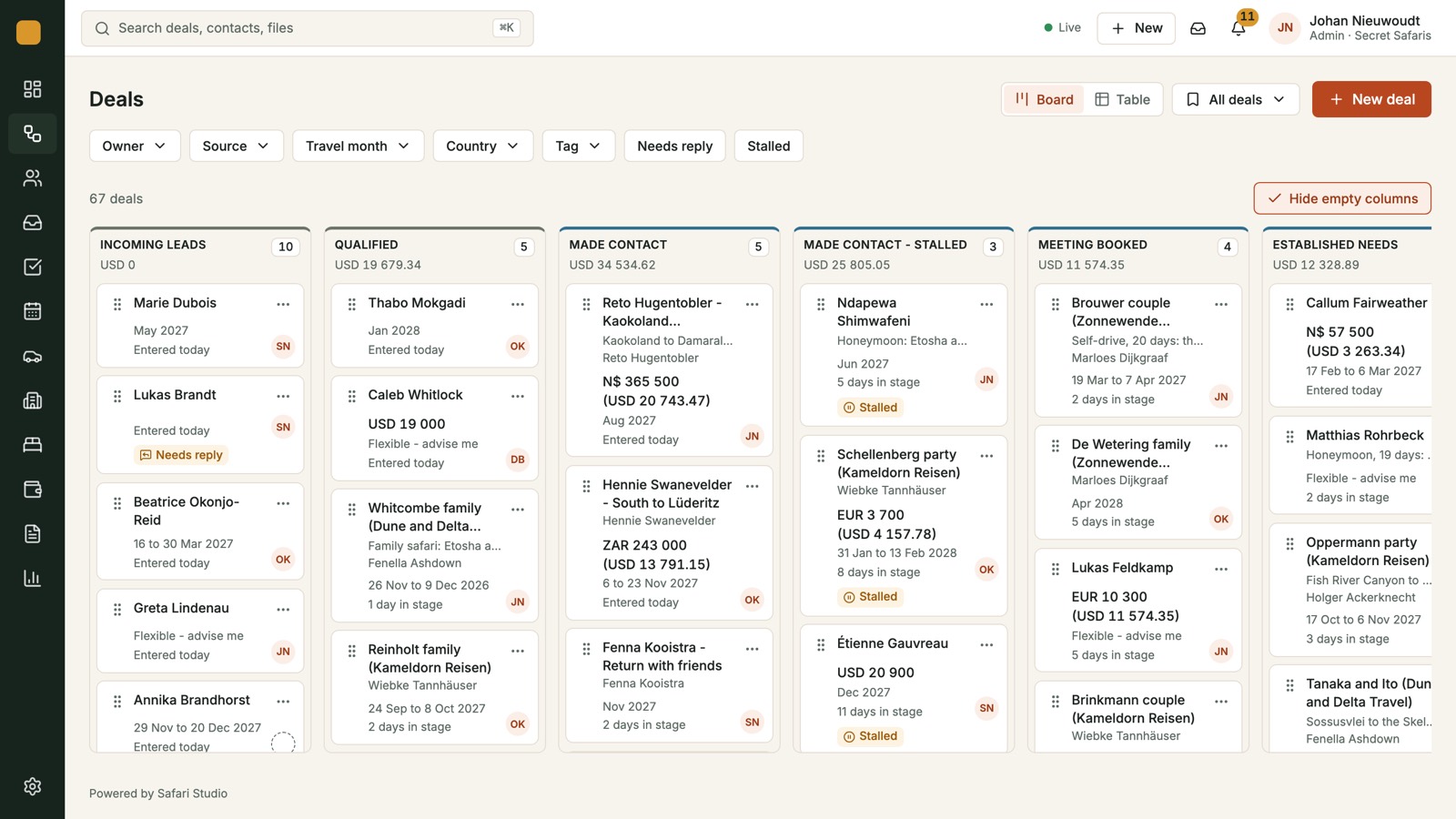
A folder knows who received a message. The board knows which departure the message is about. When a client writes later to add a night, you are not rebuilding the story from three inboxes. If you want the columns, the flags and the currencies in one place, read how the deals board tracks each trip.
Costing, the proposal and your name on the page
Build the costing day by day with your lodges, vehicles and activities at the rates you negotiated. A lodge night, a vehicle day, an activity: each sits on the day it belongs to, at the rate you entered. Each amount is stored with the exchange rate of the day, so the margin stays right when rates move. Totals are shown per adult and in other currencies. When the numbers are ready, there is a costing PDF to send.
The costing here is that arithmetic, kept on the deal. It will not invent a rate. If a lodge rate in the system is old, the quote is old. The gain is that the day, the rate and the currency stay together. Day by day costing and exchange rates is the longer account.
One click turns the costing into the client's own web page: a route map with drive times, lodge photos and a day-by-day story, in your brand. A PDF comes with it. Drive times sit between every stop. Lodge pages carry their own photos. For you, the proposal starts from the costing, so you are not writing a second version from scratch. Proposals and route maps shows what the client sees.
Your logo, colours and theme go on every proposal, quote, invoice and the client form. There are four theme presets. On Pro and Max, clients never see Safari Studio anywhere on those pages. Lite adds a small Powered by Safari Studio line. Prices, and any plan limit, stay on the pricing page. Branding on the documents your clients see covers where the logo and colours appear.
Holds, vehicles and the money still owed
Every room you ask a lodge for sits on the holds board: requested, held with an expiry date, confirmed or released. Hold requests go to each lodge from the deal. Before a hold runs out, a chaser email is ready to go, so nothing lapses quietly.
For example, a reservations manager at a small camp in the Okavango can see which rooms expire on Thursday without opening a chain of lodge mail. Holds, expiries and chasers sets out those four states.
Fleet is the same kind of view for cars. Every vehicle is on one timeline with its trips, services and blocked days. One row per vehicle, trips as bars across the dates. Services and blocked days sit on the same line. Assign a car to a trip and the clash shows before it happens, so no 4x4 is booked twice. The fleet timeline is the page for that.
Quotes are made from the costing, so the figure the client accepts is the figure you built day by day. Quotes become deposit and balance invoices, in any currency, with a card payment button. Every payment is tracked against the deal. You see what is owed and what is paid at a glance, with no payments sheet to keep current. Late payments are grouped by how late they are. The invoice carries your branding. Quotes, invoices and payments covers that path from costing to cash.
Does your company need a safari CRM?
Not yet, if the old tools are still telling the truth. Stay with the spreadsheet if you can still say all of these.
- You can name every live trip without opening a file.
- Website enquiries and email reach one person the same day.
- The costing, the proposal and the invoice are the same numbers.
- You know which holds expire this week, even if the usual person is away.
- No vehicle is promised twice, and you can show that from one view.
- You know who has paid, who owes a deposit, and who is late, without asking someone to update a sheet.
If those lines are still accurate, a new system will not make you a better host. It will only move work you already have in hand.
You are more likely to need a safari CRM when several of these are already true, even if the company still feels small.
- More than one mailbox, and enquiries waiting in a folder.
- A costing and a proposal that diverge.
- An exchange rate you no longer trust.
- A hold that lapsed, or a vehicle nearly double-booked.
- Payments a week behind.
- Clients receiving a branded file from one person and a plain attachment from another.
You do not need every one of those. Two or three, most weeks, is enough. The practical test is reconstruction. If understanding one trip means opening mail, a sheet, a folder of PDFs and a chat, the trip is already scattered.
Owners feel this as lost evenings, reservations managers as a missed reply, and a consultant who builds trips for several operators as a Friday of status chasing. Safari Studio is built for operators, DMCs and the agents who sell their trips. The value is the link from enquiry to invoice, not an address book.
It will not file park permits or write the difficult reply. Templates save typing. Flags show who is waiting. It holds the enquiry, the day's rate, the hold and its chaser, the vehicle clash, and the payment on the deal. It does not promise more bookings.
Try one real trip, not a tour of menus. Let an enquiry land on the board, build the costing day by day, and read the proposal as the client would. Put a hold on the board, assign a vehicle, and make the deposit invoice. If that feels like the week you already have, only gathered, switch. If it feels like extra steps beside a system that still works, wait.
If you would rather see it with someone, book a demo. If you would rather use a live enquiry on your own, start a free trial. No card is needed, and the spreadsheet can stay until you are sure.