

A luxury client rarely meets your software. They meet the proposal. White label travel proposals keep that meeting in your name: your logo, your colours and your theme, with no second brand competing for attention. For owners and travel designers selling private journeys, villas, yachts and expeditions, this is part of the product itself. The journey may be rare. The document that sells it should still feel as if it came from your studio, and from nowhere else.
Why white label travel proposals matter
The phrase can sound like packaging jargon. In a travel studio it is simpler. The client is choosing a firm to look after a private journey. They open a link on a phone, or a PDF on a laptop, often with a partner beside them. In that first minute they are not comparing software. They are asking whether this operator feels considered, consistent and entirely present.
If the page carries your mark, the answer starts well. If it carries a software name along the footer, or a layout that belongs to nobody in particular, the answer is muddier. The client may still book. They have, though, been reminded that a tool sits between them and you. On a journey of this kind, that reminder does no useful work.
The page often travels further than the first reader. A partner, a family office or a second traveller receives the link with no introduction from you. They have the document and nothing else. Your logo and colours do the work a meeting would have done. That is why the brand on the proposal is not a finishing touch you add if there is time. It is the introduction.
Safari Studio is a CRM for safari operators, destination management companies and the travel agents who sell their trips. One click turns the costing into the client's own web page: a route map with drive times, lodge photos and a day-by-day story, in your brand. A PDF comes with it.
What the client should see
Picture the handover. The designer has finished the costing. Lodges, vehicles and activities sit day by day at the rates you negotiated. The client receives a page. On it they should be able to find a route they can follow, drive times between every stop, lodge pages with their own photos, and a day-by-day story of the journey. They should find your logo and your colours. They should be able to keep the PDF.
They should not find a second logo, or a line that names the system you used to publish the page. On Pro and Max, that is how these documents behave. Your clients never see Safari Studio anywhere on the proposal. Your logo and colours are what the page carries.
Lite works differently, and it is better to say so than to blur the point. Lite adds a small Powered by Safari Studio line. If the rule in your studio is that no software brand shows, Pro and Max are the plans that follow the rule. What each plan includes, and what it costs, is set out when you compare plans and pricing.
Logo, colours and theme, set once
Branding here is a settings task, not a fresh design project for every trip. You add your logo, you set your colours, and you choose one of four theme presets. Those choices then apply to every proposal, every quote, every invoice and the client form.
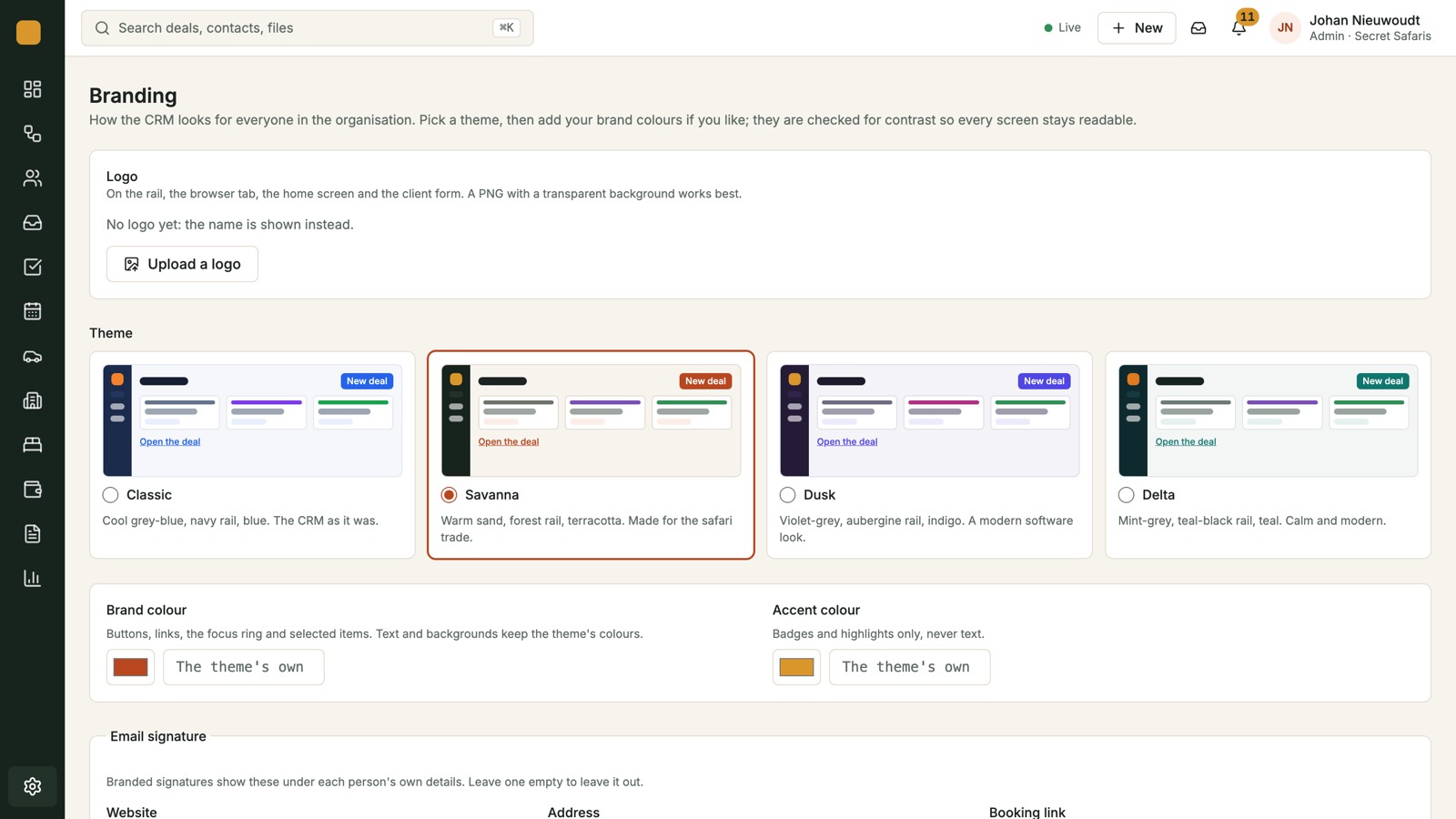
Four presets is a deliberate boundary. You are not building a new visual identity inside the CRM. You are choosing the theme closest to the way you already present journeys, then letting the logo and the colours do the recognising. A quiet, editorial studio and a warmer, photographic one will not want the same theme. Both can still be plainly themselves, because the mark at the top is theirs.
Those settings are described on the page for your logo, colours and theme on every client document. What follows is how the choice shows up once a trip is ready to send.
The proposal the client walks through
The web page is the version most clients open first. Drive times between stops matter on a safari, where a transfer can take a morning. Lodge photos matter because the room is part of what was promised. The day-by-day story is where a designer's judgement shows: why this camp on this night, and what the day is for.
Because the page is in your brand, that judgement reads as yours. On Pro and Max the client is not asked to separate your work from the tool that published it. They see your logo and your colours, not ours. The PDF gives them a copy they can file, forward or print, in that same brand.
The proposal starts from the costing you have already built, so the story and the figures share a source. You are not retyping the trip into a separate file solely to put your logo on it. Designers selling villas, yacht time or expeditions face the same test, even when the map is shorter than a multi-lodge safari. The client still wants one document that feels written for them.
You can see how the page is assembled, including drive times and lodge photos, under proposals and route maps. Branding is not a layer you add afterwards. It is how the page is published.
Quotes and invoices that still look like you
The visual break often comes after the client says yes. The proposal looked like the studio. The invoice looks like an export from somewhere else. The person who has just committed to a private journey is asked to pay on a page that does not resemble the page they trusted.
Quotes are made from the costing. They become deposit and balance invoices, in any currency, with a card payment button. Every payment is tracked against the deal. The brand point is simpler than the payment mechanics: the quote and the invoice carry the same logo, colours and theme as the proposal. On Pro and Max, Safari Studio does not appear on them.
For example, a travel designer has a client ready to confirm a private expedition. The deposit invoice should be recognisable as the same firm that sent the route map. Same mark, same colours, a clear amount, and a card payment button. The client should not have to wonder whether the payment page belongs to you. The payment flow itself sits with quotes, invoices and payments. A white label standard that stops at the proposal is only half a standard.
The form the client fills in
After the proposal, clients are often asked for names, dates of birth, dietary notes and how they like to travel. That request is still a branded moment. A bare form, with no logo and no colours, feels as if a different company has taken over the relationship.
Your logo, colours and theme sit on the client form as well. On Pro and Max the form does not show Safari Studio. Preferences are personal, whether the trip is a safari, a villa stay or time on the water. The page that collects them should feel like a continuation of the proposal, not a handover to an unnamed system.
Keeping the software name on your side of the screen
There is a clean line, and it is worth agreeing as a studio. Your team can work inside Safari Studio all day. The client should meet your brand only.
Mail, stages and tasks can stay in the office. The client does not need to know which stage a deal sits in, or which reply is flagged. They need a page that looks like you prepared it, because the itinerary, the wording and the choice of lodges are yours.
Supplier work belongs on the same side of the line. Room requests and hold expiries are how you keep a trip from lapsing. They are not part of the client's reading. The note that goes to a lodge can be plain and practical. The page that goes to the client should still be the branded one. Forwarding an internal note that looks nothing like your proposal is how a careful brand frays.
Owners sometimes worry that a shared system will make every operator look the same. The four theme presets are shared starting points. The logo and the colours are not. A client comparing two firms is comparing two brands, provided each studio has set its own marks. If the logo is missing, no theme will disguise the gap. Put the logo in before the first document goes out.
From the costing to a page that is already yours
A branded page is only calm if the numbers under it are calm. You build the costing day by day, with your lodges, vehicles and activities at the rates you negotiated. Each amount is stored with the exchange rate of the day, so the margin stays right when rates move. Totals can be shown per adult and in other currencies. If you need the figures on their own, a costing PDF is ready to send.
When those numbers are right, you do not start a second job of making them look like you. One click turns the costing into the client's web page and PDF, already using the logo, colours and theme you set. For a small studio that is the useful part. The person who knows the trip is the person who publishes it. There is no handover to someone else whose only task is to put the brand on.
When a night changes, or a rate moves, the brand does not have to be rebuilt. It lives in the settings. The proposal you generate from the revised costing still carries the same logo, colours and theme. You are revising the journey, not the identity. How amounts keep the exchange rate of the day is set out under day-by-day costing. The claim here is only that the branded page and the figures start from the same place.
A standard the studio can keep
Brand rules fail when they depend on memory. A footer gets forgotten. Last season's PDF goes out because the client is waiting. An invoice is raised in a hurry from a different tool, and the payment page names nobody the client has met. A standard that lives in the settings is easier to keep, because the next document inherits it.
Agree the rule in plain language:
- Set the logo, the colours and the theme before the first client document goes out.
- Use that set on proposals, quotes, invoices and the client form.
- On Pro and Max, read a document as the client will, and confirm that Safari Studio does not appear. On Lite, expect the small Powered by Safari Studio line, and decide if that meets your standard.
- Let email signatures sit beside the visual brand. Templates and signatures can be set for every person and every mailbox. The words remain yours to write.
For example, a lodge operator in the Okavango and a designer selling expedition departures can share that rule, even when the trips look nothing alike. The documents are the same kinds of pages. The mark on them should be the operator's, not the software's.
Clients can usually tell that a document was produced with care. What they should not be able to tell, on Pro and Max, is the name of the software. A clear, consistent page signals that the studio wrote the journey. A page that advertises the tool suggests the tool was the author. You want the first. Logo, colour and theme are how you answer, without making a speech about it.
Safari Studio is sold as a monthly, quarterly or yearly subscription, with a free trial and no card needed. Book a demo if you want to see logo, colours and theme on a proposal before you decide. Start a free trial if you would rather set your own logo and read the page as your client would: whose name is on it, and whose is not.