

A client email is not a side task. It is the trip, still in words: dates, lodge choices, who is travelling, and what was promised on price. Most of that arrives as mail, and then it drifts. A travel CRM email integration is the plain fix. The thread should sit beside the deal it belongs to, so anyone on the team can read it, reply, and see the costing without opening a second inbox.
Most operators already have mail. They have a shared address, a few personal Gmail accounts, and a habit of forwarding the important bits. That habit holds until someone is on a game drive, on leave, or simply in another tab. The client writes again. The person who knows the answer is not the person who sees the new message.
This piece is about that gap. It is not a tour of every screen, and it will not organise a season for you. It is about where client mail should live if you sell trips: next to the trip, in a record the whole desk can open.
Why travel CRM email integration beats a busier inbox
Connectors, plugins and shared labels will get you part of the way. The failure is rarely that mail is hard to receive. The failure is that the mail and the trip are different records, owned by different people, updated at different times.
Picture a normal week at a tour operator, a DMC or an agency. A website form comes in overnight. Someone copies the names into a spreadsheet. The reply goes from a personal account, because that is where the signature looks right. A lodge confirms a hold in a separate thread. The quote leaves as a PDF from yet another address. A week later the client asks what was included. The answer exists. Finding it means searching three inboxes and hoping the right person is online.
A travel CRM email integration should collapse that search. Mail from the inboxes you already use arrives in one list. Each thread is linked to the client and to the deal. A reply, sent from the CRM or from Gmail, stays on that deal. The trip is the folder. The inbox is how you reach it.
That is a smaller promise than a fully automated sales machine, and a more useful one. You still write the email. You still decide the rate. You stop losing the thread between those two jobs.
What shared inboxes and personal mail both miss
A shared inbox looks like teamwork. Everyone can open the reservations address and see what came in. In practice it often means everyone can see the mail and nobody owns the reply. Messages sit until someone feels responsible. Two people answer the same client. Or nobody does, because each person assumed the other had it.
Personal mail has the opposite fault. The relationship is clear, and so is the risk. The history lives in one sent folder. When that person is out, the trip is half blind. A colleague can see the booking notes. They cannot see that you already told the client the camp was full, or that you offered a different vehicle.
For example, a reservations lead at a small operator might run the open trips from one Gmail account. That can work in a quiet month. It fails the week they are on the road with a group, and a client writes to change a room. The colleague covering the desk can see a line in a spreadsheet. They cannot see the last few emails. They either guess, or they wait, and the client waits with them.
The test is simple. Open any live trip. Can you read what was asked, what was promised, and what is still unanswered, without asking a colleague to forward a thread? If the answer is no, the mail is in the wrong place. It is not beside the trip.
One list for every synced mailbox
Safari Studio is a CRM for safari operators, DMCs and the travel agents who sell their trips. The inbox is built around that test, not around a new place to file things later.
Mail from every synced mailbox sits in one list. Each thread is linked to its client and its deal. You are not keeping a shadow copy in a folder called 'to file'. The link is the filing. Open the deal and the conversation is there. Open the conversation and the deal is there.
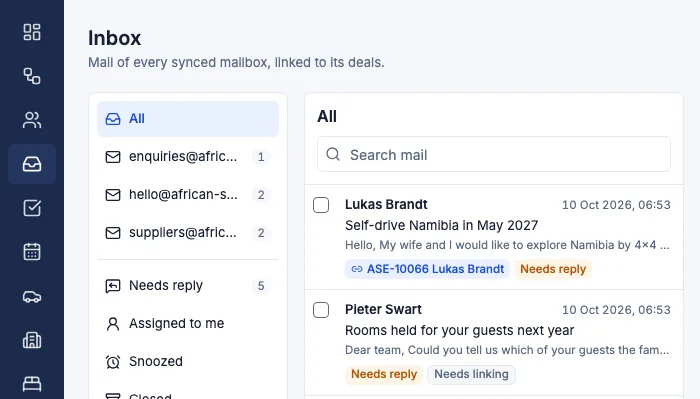
Gmail syncs both ways. If a colleague replies from Gmail, because that is the app already open on their phone, the reply still lands on the deal. If they reply inside Safari Studio, Gmail stays in step. You do not have to pick one door and then police it.
Any other mail provider can come in through a forwarding address. You do not have to move the whole company onto one host before a thread can sit with the trip. The address clients already know can keep working. What changes is that the mail is no longer only in that mailbox.
The shared inbox that links each thread to its client and deal is the place to start if this is the Monday problem. It is not a second list to check and then ignore. It is the list, with the trip attached.
Needs reply, templates and a name on the thread
Seeing the mail is only half of the job. The other half is knowing which threads still need a person.
Needs reply flags mark the conversations where the client is waiting. Unanswered mail is also flagged on the deal, beside stalled deals, so a quiet thread does not look like a healthy one. A deal can sit in the right stage and still be stuck, simply because nobody wrote back.
That flag is more honest than a full inbox. A full inbox says the desk is busy. A needs reply flag says this person is waiting. An owner can see it without reading every message. The person covering a day off can see it without guessing which threads are live.
Email templates and signatures sit with that, for every person and every mailbox. A template is not a trick to sound less human. It stops you rewriting the same opening, the same note about what a hold means, and the same closing, while the mail still goes out under the right name. Each person keeps a signature. Each mailbox can have its own. The client meets one company, not a relay of slightly different voices, and the conversation stays one thread.
Website enquiries arrive as deals, thread attached
Plenty of enquiries never start in a mailbox you chose. They start on the website, often after hours. If that form lands in a folder, or in one person's mail, it waits until someone has time to create a trip record. The wait is invisible. There is no deal yet, so nothing can be flagged as stalled.
Website enquiries arrive on the deals board as new deals, so nothing waits in a folder. The email thread is linked from the start. You drag deals through your own stages. Stalled deals and unanswered mail are flagged. The website enquiry form feeds the board. The first reply is already beside the trip it may become, even while that trip is still only a maybe.
Currency should not force the thread into a side spreadsheet. A deal can hold any currency, with its value at the day's rate. That matters when the enquiry is in one currency and the lodges invoice in another. The mail does not set the rate. It does keep the client's words next to the number, so you are not quoting from memory of an old thread.
The deals board, where each new enquiry arrives with its thread is where that handoff happens. Stages are a subject of their own. The point here is narrower: the email should not be a prelude you file after the deal exists. It should be on the deal the moment the deal exists.
Rules that notice the mail
A linked thread still needs a nudge. Someone has to turn a new email into a deal, notice a reply, and remember the follow-up. If that depends on a morning ritual, it slips on the busy mornings, which are the mornings it matters.
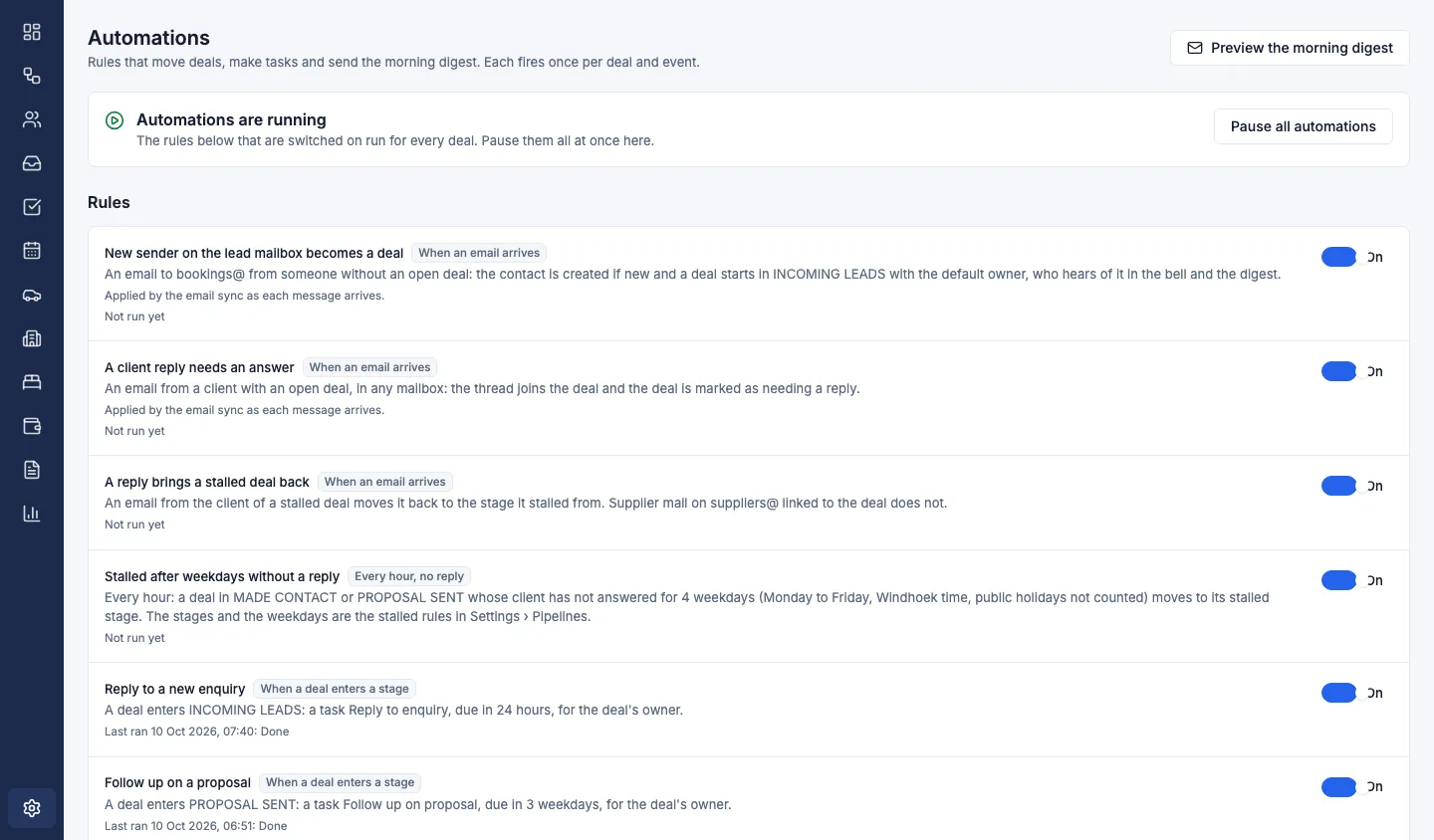
The automations screen holds rules for that routine noticing. A new email can become a deal. A reply can be flagged. A deal that has gone quiet can be moved. A follow-up task can be created, so the next action has a name and a day, not a vague sense that you should write soon.
These rules do not sell the trip. A person still writes the answer, still checks the lodge, and still decides whether the price is right. The gain is that the noticing does not depend on who happens to be at the desk.
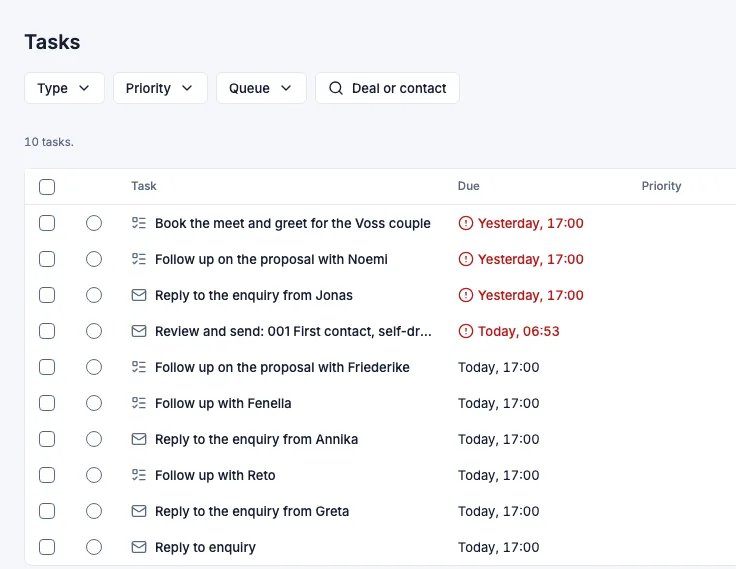
My day collects the same idea into a list you can start from. Today's follow-ups and replies are there, with the overdue ones in red. You do not begin by hunting through mailboxes to remember who you owe. You begin with the trips that need a word from you.
Answer with the trip in view
Once the thread lives on the deal, you can answer with the record in reach: the hold, the rate and the vehicle, not a second search.
Costing is built day by day, with lodges, vehicles and activities at the rates you negotiated. Each amount is stored with the exchange rate of the day, so the margin stays right when rates move. The day-by-day costing sits on the same deal as the client's question.
Every room you ask a lodge for is on the holds board: requested, held with an expiry, confirmed or released. A chaser is ready before a hold runs out. Quotes become deposit and balance invoices, with a card payment button, and payments are tracked on the deal.
A proposal can go out in your logo and colours. The fleet timeline shows a clash before a vehicle is promised twice. Those screens do not replace the inbox. They are why the thread has to live on the deal.
Before you connect a mailbox
A shared list only helps if the right people can see it, and if mail that belongs on the deal is synced or forwarded. Keep the address clients already use. Gmail syncs both ways. Any other provider can come in through a forwarding address.
A request to move a night should not look like a rate sheet. Needs reply flags, and a task for the follow-up, exist so the waiting client is what you see first.
Safari Studio is sold as a monthly, quarterly or yearly subscription, with a free trial and no card needed. Details are on the pricing page.
The client writes. The thread is on the deal. The next person can read what was promised without asking for a forward. That is the point of mail beside the trip.
You can book a demo and walk through a live thread on a deal, or start a free trial and connect a mailbox yourself. No card is needed to begin.